Use the RDM sheet
To open the RDM sheet tap at an empty space in the user defined area, tap at Sheets and then RDM.
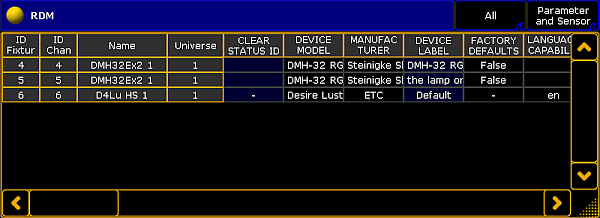
RDM sheet
- The RDM sheet is used to have a quick overview about the discovered RDM devices, their parameters, and their sensors.
- You can set RDM parameter, see work with RDM parameters.
- You can monitor RDM sensors, see work with RDM sensors.
- The first title bar button in the RDM sheet allows to filter the RDM sheet by:
- All: Displays all RDM discovered RDM devices
- Current Fixture Type: Displays to the selected fixture or channel the RDM devices with the same fixture type.
- Selection: Displays only the RDM devices of the fixture or channel selection
- Alerts/Warnings: Displays only the RDM devices with a notification
- Unmatched Fixtures: Displays only the unmatched RDM devices - The second title bar button in the RDM sheet allows to filter the RDM sheet by:
- Parameters and Sensors
- Parameters
- Sensors - For a better overview, you can sort every column up-and-down. To sort a column tap and hold in a header cell of the RDM sheet or right mouse click in the header cell.